JSON Grid X › Guides › Visualize complex JSON
Best way to visualize complex, nested JSON
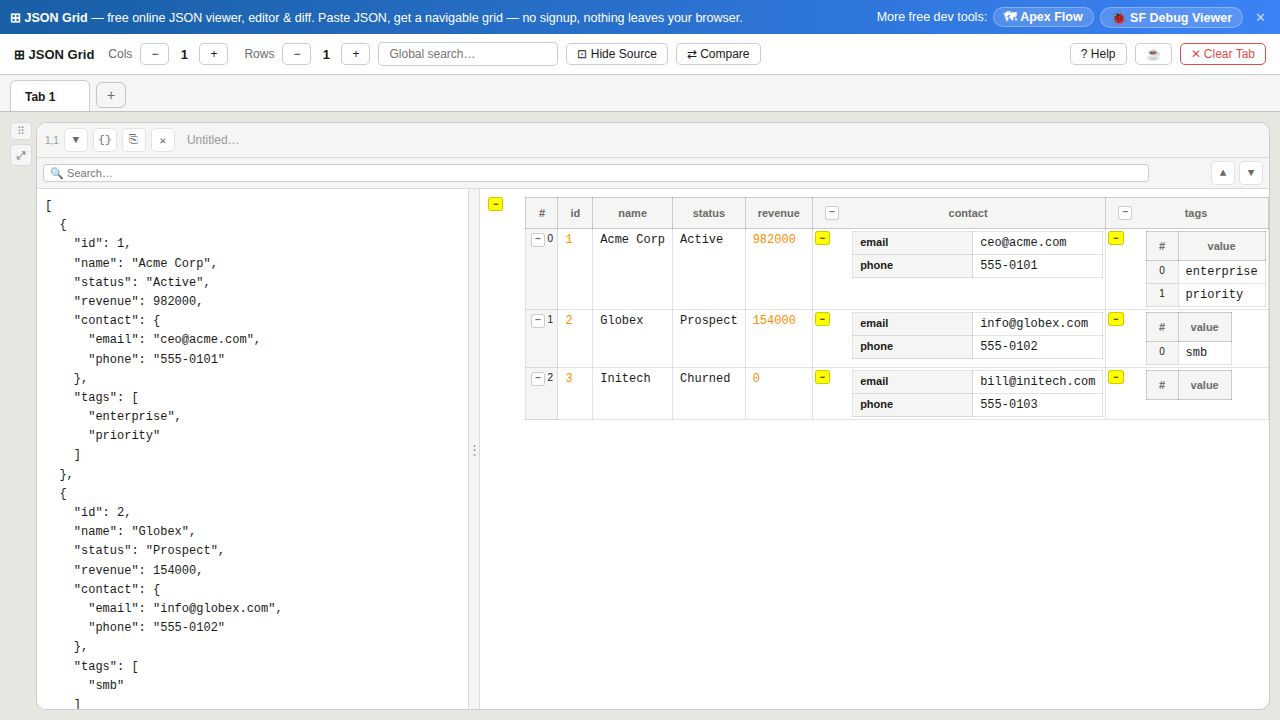
A deeply nested API response or config file is almost unreadable as raw text. The trick to visualizing complex JSON is to combine three views — pretty-print, a collapsible tree, and a grid table — so you can fold away the noise and focus on the one branch you care about.
Open JSON Grid X →Three ways to make nested JSON readable
- Pretty-print it first. Paste the JSON into a cell and it is formatted with clean indentation — the baseline for reading any structure.
- Collapse what you don't need. Every object and array can be folded independently. Collapse the top-level branches, then expand only the path you are investigating, so a 500-line payload becomes a handful of visible lines.
- Flip arrays into a grid. Arrays of objects render as a table — one row per item — which is far easier to scan than a long vertical list of repeated keys.
For genuinely complex structures
- Use a multi-cell workspace. Split a big document across several cells, or keep related payloads side by side, instead of scrolling one giant blob.
- Search across values. Jump straight to the key or value you need; matches are highlighted in place.
- Diff two versions. Select two values and Compare them to see a color-coded, side-by-side diff — ideal for spotting what changed between two responses.
- Keep it private. Parsing happens entirely in the browser, so even sensitive structures never touch a server.
Rule of thumb: pretty-print to format, collapse to focus, grid to compare. Most "unreadable" JSON becomes clear the moment you collapse the branches you aren't looking at.
Frequently asked questions
- What is the best way to visualize a complex JSON structure?
- Combine a collapsible tree with a grid table. Pretty-print the JSON, collapse the branches you don't need, and view arrays of objects as tables so large structures stay scannable. JSON Grid X does all three in one workspace.
- How do I make nested JSON readable?
- Pretty-print to add indentation, then collapse and expand individual objects and arrays to fold away everything except the path you're reading. Deeply nested arrays can also be shown as tables.
- How can I compare two complex JSON objects?
- Put each document in its own cell, select the two values, and use Compare for a color-coded, side-by-side diff of exactly what changed.