JSON Grid X › Guides › View JSON as a table
How to view JSON data as a table online
Raw JSON is hard to scan. The fastest way to read it is to turn an array of objects into a spreadsheet-style grid — rows and columns you can skim like a table. Here is how to do it in your browser, with nothing to install and nothing uploaded.
Open JSON Grid X →View JSON as a table in 4 steps
- Open JSON Grid X. It loads instantly in any modern browser and runs 100% client-side — your data never leaves your machine.
- Paste your JSON into a cell, or drag & drop a
.jsonfile onto it. You can also load the built-in sample from the ? Help panel to see it working in one click. - Read it as a grid. An array of objects renders as a table: one row per item, one column per key. Nested objects and arrays sit inside their cells and expand on click.
- Drill in. Expand or collapse any node, search across values, and copy any branch. Add more cells to view several documents side by side.
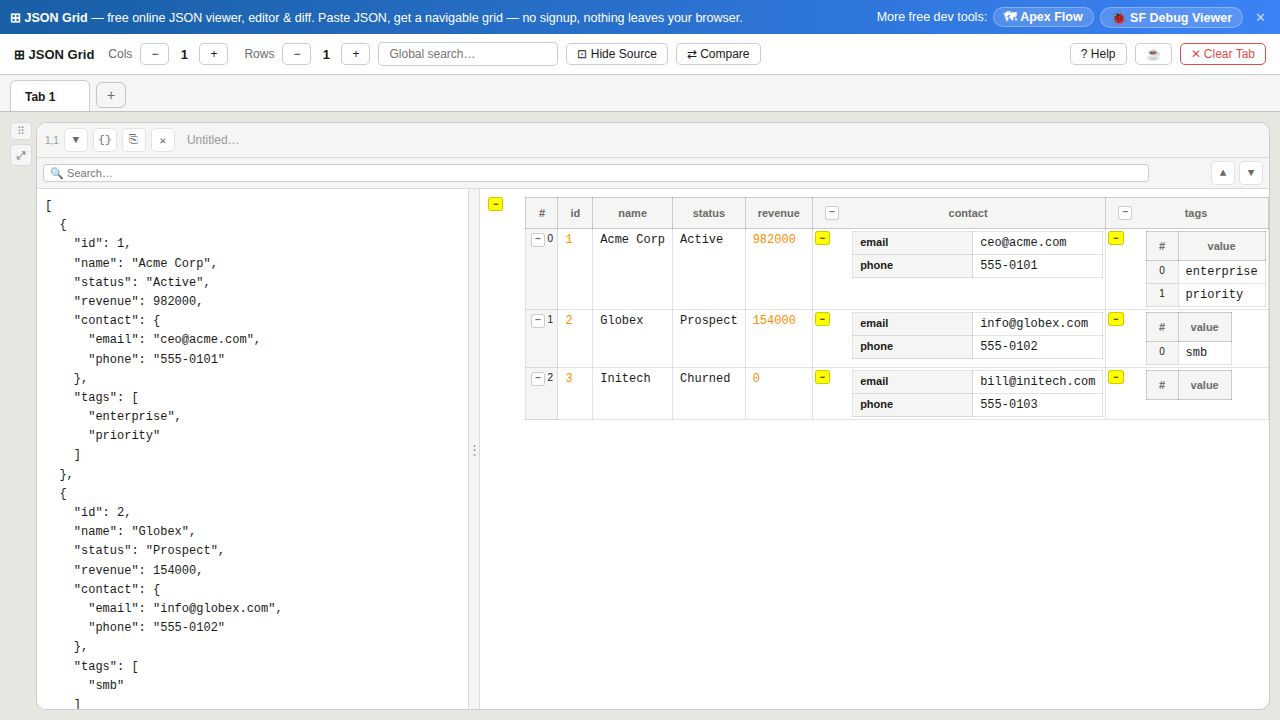
Why a grid beats raw text
- Scannable like a spreadsheet — column headers and aligned rows make it easy to compare records at a glance.
- Nested data stays in context — child objects and arrays expand inline instead of forcing you to count brackets.
- Side-by-side cells — view (and diff) two JSON documents at once in the same workspace.
- Private — everything is parsed in the browser, so sensitive payloads are never sent to a server.
Looking for something closer to Excel? JSON Grid X lays arrays of objects out as a real grid of rows and columns, with the underlying JSON one click away — so you get the spreadsheet feel without leaving the structure behind.
Frequently asked questions
- How do I view JSON data as a table online?
- Open JSON Grid X, paste your JSON (or drop a
.jsonfile) into a cell, and an array of objects renders as a table — one row per item, one column per key. No upload, no signup. - Is there an online JSON viewer that looks like Excel?
- Yes. JSON Grid X shows arrays of objects in a spreadsheet-style grid with column headers and rows, similar to Excel or Google Sheets, while keeping the raw JSON a click away.
- How do I display a JSON array in a grid view?
- Paste an array of objects into a cell and switch to the rendered view: each object becomes a row and each property becomes a column, so the array is shown as a readable grid instead of raw text.